UTM Tracking for Refersion: How to Build and Validate Affiliate Campaign Links
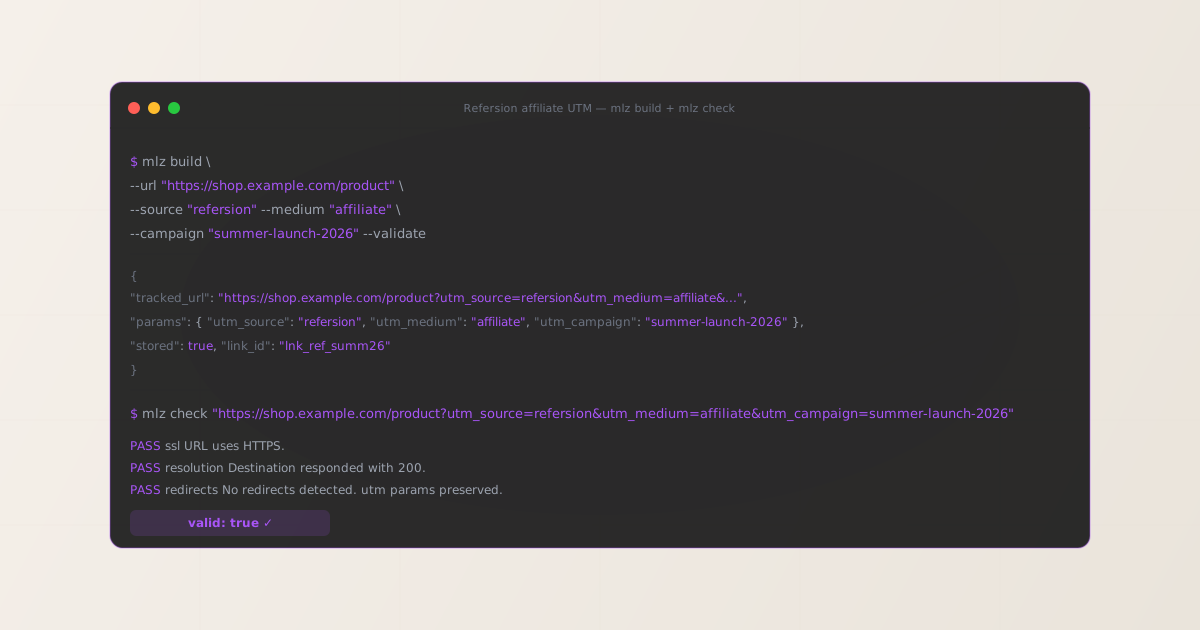
To add UTM tracking for Refersion, configure UTM parameters on the destination URL you register in each affiliate offer — not on the Refersion affiliate tracking links that your affiliates distribute. When a referred customer clicks an affiliate’s Refersion tracking link (r.refersion.com/...), Refersion records the referral event for commission attribution and redirects the visitor to your registered destination URL, carrying any query parameters you placed on it. GA4 reads UTM parameters from that landing page URL after the Refersion redirect completes. Use MissingLinkz mlz build to generate a normalized destination URL with consistent lowercase UTM values and mlz check to confirm that Refersion’s redirect delivers those parameters intact before your affiliate program goes live. The most common Refersion UTM attribution error: merchants add UTM parameters to the Refersion affiliate link itself rather than to the destination URL registered in the offer — those parameters sit in the tracking link URL but are not forwarded to the landing page, causing GA4 to record every Refersion-driven session as direct traffic.
How Refersion routes traffic and where UTM parameters belong
Refersion is an affiliate and influencer marketing platform used primarily by direct-to-consumer e-commerce brands running on Shopify, WooCommerce, BigCommerce, and custom storefronts. Merchants configure their affiliate program in Refersion’s dashboard, set a destination URL (typically the store homepage or a specific product or landing page), and invite affiliates who then receive unique tracking links. When a visitor clicks an affiliate’s link, Refersion’s tracking infrastructure records the referral event — attributing the commission to the affiliate — and redirects the visitor to the merchant’s registered destination URL.
Refersion’s click tracking and commission attribution operate independently of GA4. Refersion records a referral event using its own first-party tracking cookie; GA4 attribution depends entirely on UTM parameters present in the destination URL after the Refersion redirect completes. These two tracking systems serve different purposes: Refersion tracks commission-eligible conversions for affiliate payouts; GA4 tracks channel performance and revenue attribution for the merchant’s internal analytics. Both systems run in parallel without interfering with each other when configured correctly.
The consequence for UTM tracking: UTM parameters belong on the destination URL registered in the Refersion offer settings, not on the affiliate tracking links that Refersion generates for affiliates. Merchants do not control how Refersion generates affiliate tracking links — those are produced automatically by Refersion’s platform. The configuration point you own is the destination URL field in each offer. Paste the UTM-tagged URL generated by mlz build into that field. For a broader explanation of UTM parameter placement in affiliate redirect architectures, see the UTM tracking for developers guide.
Building Refersion destination URLs with mlz build
Refersion merchants managing affiliate programs across multiple products, promotions, or influencer cohorts frequently encounter GA4 attribution fragmentation: different team members generating destination URLs independently use inconsistent UTM values (refersion, ref, Refersion, referral-refersion) and inconsistent medium values (affiliate, influencer, referral, Affiliate). GA4 records each unique combination as a separate row in the Acquisition report, fragmenting what should be a single “Refersion Affiliate” channel into several disconnected entries.
The recommended naming convention for Refersion traffic is utm_source=refersion, utm_medium=affiliate, and utm_campaign=[offer-or-cohort-slug]. Use utm_content to differentiate between individual affiliates or creative variants within the same campaign. mlz build enforces these values through structured flags rather than free-text entry, preventing the casing and spacing inconsistencies that fragment GA4 data.
$ mlz build \
  --url "https://shop.example.com/summer-sale" \
  --source "refersion" \
  --medium "affiliate" \
  --campaign "summer-launch-2026" \
  --content "influencer-cohort-a" \
  --validate

{
  "tracked_url": "https://shop.example.com/summer-sale?utm_source=refersion&utm_medium=affiliate&utm_campaign=summer-launch-2026&utm_content=influencer-cohort-a",
  "params": {
    "utm_source": "refersion",
    "utm_medium": "affiliate",
    "utm_campaign": "summer-launch-2026",
    "utm_content": "influencer-cohort-a"
  },
  "destination_url": "https://shop.example.com/summer-sale",
  "link_id": "lnk_ref_summ26a",
  "campaign_id": "cmp_summer-launch-2026",
  "stored": true,
  "created_at": "2026-07-07T09:00:00.000Z"
}
The tracked_url value is what you register as the destination URL in the Refersion offer configuration. Affiliates never see or modify this URL directly — they receive their unique Refersion tracking link, which Refersion uses to record the referral before forwarding the visitor to your UTM-tagged destination. For programs running multiple landing page variants per offer, generate a distinct destination URL per variant using the --content flag to distinguish creative performance in GA4 without creating separate Refersion offers:
mlz build --url "https://shop.example.com/summer-sale" --source "refersion" --medium "affiliate" --campaign "summer-launch-2026" --content "influencer-cohort-b"
For naming conventions and how consistent casing prevents GA4 data fragmentation across affiliate source values, see the UTM naming conventions guide. To generate destination URLs programmatically for Refersion offer batches via the REST API, see how to build UTM links programmatically.
Validating the Refersion redirect chain with mlz check
Once you have a UTM-tagged destination URL, validate it end-to-end with mlz check before registering it in the Refersion offer configuration and before activating the affiliate program. mlz check follows the complete redirect chain from your destination URL, confirms the server responds with a 200 status code, and verifies that query parameters are not stripped at any hop. Run this validation before publishing the offer, and re-run it after any infrastructure changes that affect URL handling on your store or landing page — particularly after Shopify theme updates, landing page builder version changes, or custom redirect rules deployed via your CDN or middleware.
$ mlz check "https://shop.example.com/summer-sale?utm_source=refersion&utm_medium=affiliate&utm_campaign=summer-launch-2026"

{
  "url": "https://shop.example.com/summer-sale?utm_source=refersion&utm_medium=affiliate&utm_campaign=summer-launch-2026",
  "valid": true,
  "checks": [
    { "check": "url_format", "status": "pass", "message": "URL format is valid." },
    { "check": "ssl", "status": "pass", "message": "URL uses HTTPS." },
    { "check": "resolution", "status": "pass", "message": "Destination responded with 200.", "details": { "status_code": 200, "response_time_ms": 214 } },
    { "check": "redirects", "status": "pass", "message": "No redirects detected." },
    { "check": "response_time", "status": "pass", "message": "Response time: 214ms.", "details": { "response_time_ms": 214 } }
  ],
  "status_code": 200,
  "response_time_ms": 214,
  "validated_at": "2026-07-07T09:01:00.000Z"
}
A valid: true result confirms the destination URL resolves correctly and query parameters survive the complete redirect chain. If valid is false, the checks array identifies the failing step. Common failure modes for Refersion destination URLs include Shopify storefront redirect rules that strip query strings when enforcing canonical URL formats, theme-level URL normalizations that drop query parameters on product pages, and landing page builder configurations (Unbounce, Instapage) with query string passthrough disabled. For a walkthrough of diagnosing redirect chain failures, see how to check if a redirect strips UTM parameters.
Refersion UTM tracking gotchas for merchants
- UTM parameters go on the destination URL, not on the Refersion affiliate tracking link
- Refersion generates unique tracking links for each affiliate in your program — these links belong to the affiliate, not to you. Adding UTM parameters to the Refersion affiliate tracking link itself does not work: Refersion’s redirect system forwards the visitor to the destination URL you registered in the offer, not to a URL constructed from the affiliate link’s query parameters. The only configuration point you control as a merchant is the destination URL field in the offer settings. Paste the UTM-tagged URL from
mlz buildinto that field and Refersion’s redirect will forward all visitors — regardless of which affiliate they came from — to your UTM-tagged landing page, where GA4 fires and records the attribution. - One destination URL applies to all affiliates in an offer — differentiate by campaign or content, not by affiliate
- A single Refersion offer has a single destination URL that applies to every affiliate promoting that offer. This means you cannot track individual affiliate performance through GA4 UTM parameters at the offer level — all traffic from all affiliates lands on the same UTM-tagged page. Refersion’s own affiliate dashboard handles per-affiliate performance reporting using its internal referral tracking. For GA4, focus UTM tracking on campaign-level and cohort-level segmentation: use
utm_campaignto distinguish between promotions (summer-launch, back-to-school, influencer-2026) andutm_contentto distinguish between affiliate cohorts (top-tier, micro-influencers, coupon-sites). Create separate Refersion offers with distinct UTM-tagged destination URLs if you need offer-level GA4 segmentation. - Shopify storefront URL canonicalization can silently strip query parameters
- Shopify stores built on Online Store 2.0 themes apply URL canonicalization rules that rewrite incoming URLs to match the product or collection’s canonical URL format. Depending on the theme and any installed apps, these rewrites can drop all query parameters from the URL before the page renders — GA4 fires on the cleaned URL with no UTM data present. This is the most common cause of complete Refersion UTM attribution loss in Shopify stores: the Refersion dashboard shows referral clicks, but GA4 shows zero Affiliate channel sessions. Run
mlz checkagainst your destination URL with UTM parameters appended and look for anyredirectscheck that shows parameters being dropped. If confirmed, disable the theme’s URL canonicalization for query strings or use a Shopify-compatible query string preservation approach before re-running validation. - Refersion’s coupon code tracking operates independently of UTM attribution
- Refersion supports affiliate-specific coupon codes as an alternative or complement to tracking links — particularly useful for influencer and podcast affiliate programs where listeners type a code rather than click a link. Coupon-based conversions are recorded by Refersion’s checkout integration (Shopify, WooCommerce) when the code is applied, and they appear correctly in Refersion’s dashboard regardless of UTM parameters. However, coupon code conversions do NOT carry UTM attribution into GA4 unless the shopper also arrived via a UTM-tagged URL in the same session. There is no way to retroactively apply UTM attribution to a conversion that arrived through a coupon code without a tracked link. For GA4, coupon-code affiliate conversions appear as organic or direct traffic. This is an inherent limitation of coupon tracking, not a configuration error — document this gap in your attribution methodology and do not attempt to manipulate UTM data to compensate.
- Validate destination URLs after every Refersion offer update
- Refersion allows merchants to update the destination URL for an existing offer at any time — useful when a promoted product goes out of stock and needs to redirect to an alternative page, or when a landing page URL changes after a site restructure. Each time the destination URL changes, re-run
mlz checkagainst the new URL to confirm the redirect chain is intact and query parameters are preserved before the updated URL propagates to affiliates. A broken destination URL in an active Refersion offer means every affiliate click delivers visitors to a 404 or a broken redirect, silently burning affiliate relationship goodwill and losing attribution data simultaneously. For automating this validation across multiple offers on a schedule, see automating campaign link validation in CI/CD.
Frequently asked questions
- Where do I add UTM parameters for Refersion tracking?
- In the Refersion merchant dashboard, open each affiliate offer and configure the destination URL with UTM parameters already appended. Generate the UTM-tagged URL using MissingLinkz
mlz buildto ensure consistent lowercase-hyphenated formatting, then paste it into the destination URL field in the offer settings. The format is:https://shop.example.com/product?utm_source=refersion&utm_medium=affiliate&utm_campaign=offer-name. When an affiliate’s tracking link is clicked, Refersion forwards the visitor to this URL and GA4 reads the UTM parameters from the landing page URL to attribute the session to your Refersion affiliate program. - What UTM values should I use for Refersion?
- Use
utm_source=refersion,utm_medium=affiliate, andutm_campaign=[offer-name-slug]. Keep all values lowercase-hyphenated:summer-launch-2026rather thanSummer Launch 2026. GA4 treatsrefersionandRefersionas two different sources, so inconsistent casing across your team fragments the Refersion row in GA4’s Acquisition report. Usemlz buildto generate all Refersion destination URLs from structured flags to enforce this convention automatically across your team. - Can I track individual affiliate performance through UTM parameters in GA4?
- Not at the offer level. A single Refersion offer has one destination URL shared by all affiliates in that offer. All their traffic lands on the same UTM-tagged page with the same
utm_source=refersionvalue — GA4 sees all of it as one aggregate Refersion channel. Refersion’s own reporting provides per-affiliate click and conversion data using its internal referral attribution. For GA4 segmentation, differentiate by creating separate Refersion offers with distinctutm_campaignorutm_contentvalues per affiliate tier or cohort, rather than per individual affiliate. This is the scalable approach: GA4 shows you which affiliate cohorts drive revenue, Refersion shows you which individual affiliates within those cohorts deserve commission. - Why is Refersion traffic showing as direct in GA4?
- The most common causes are: (1) UTM parameters are on the Refersion affiliate tracking link rather than the destination URL — they are not forwarded to the landing page; (2) the destination URL has a redirect rule (Shopify canonicalization, landing page builder passthrough settings, HTTPS enforcement) that strips query parameters before GA4 fires; (3) the affiliate’s tracking link uses a coupon code rather than a click, so no UTM-tagged URL is involved. Run
mlz checkagainst your destination URL with UTM parameters appended to identify option 2. Check your Refersion offer settings to confirm the UTM-tagged URL is in the destination URL field for option 1. For option 3, document the coupon attribution gap in your methodology. - Does Refersion’s redirect strip UTM parameters?
- Refersion’s own redirect infrastructure (
r.refersion.com) forwards the visitor to the merchant’s destination URL and preserves query parameters on that destination URL. The UTM parameters you configure are attached to the destination URL itself, not to the Refersion tracking link, so the redirect mechanism does not interact with them — Refersion delivers the visitor directly to your UTM-tagged destination URL intact. If UTM parameters are being lost, the failure is almost always on the merchant’s server side: a Shopify URL rewrite, a landing page builder configuration, or a CDN redirect rule stripping query strings from incoming requests. Usemlz checkto identify exactly where in the chain parameters are dropped.
Recommended posts
Build Refersion-ready UTM destination URLs and validate every redirect before your affiliate program activates
mlz build generates normalized, consistently cased UTM destination URLs for Refersion offers — eliminating source and medium fragmentation across your team. mlz check validates the full redirect chain, catching Shopify URL canonicalization issues, landing page builder query string passthrough failures, and HTTPS enforcement redirects that silently strip UTM parameters before GA4 fires.
1,000 links/month free. No credit card.
Your API key
Save this now — it won't be shown again.
npm install -g missinglinkz
Free plan: 1,000 links/month. No credit card. See the UTM tracking for developers guide for the full programmatic workflow.