UTM Tracking for ConvertKit (Kit) Campaigns: How to Build and Validate Email and Sequence Links
UTM tracking for ConvertKit — now rebranded as Kit since September 2024 — raises the same source-naming question that Brevo/Sendinblue users face: should new sends use utm_source=convertkit or utm_source=kit? Teams that have been tracking email since before the rebrand hold historical GA4 data under the old name. New sends start accumulating under a different value. Without a deliberate choice, the same email channel fragments into two separate source rows in every GA4 Traffic Acquisition report. Add to this that Kit's primary send types — broadcasts and sequences — have different UTM campaign naming requirements, and that Kit's built-in click tracking interacts with manually applied UTM parameters in ways that can cause duplication, and UTM tracking for Kit is worth setting up deliberately. This article covers the correct UTM conventions for Kit broadcasts and sequences, how to handle the ConvertKit-to-Kit name migration cleanly, how to build consistent links with mlz build, and how to validate destination URLs before every send.
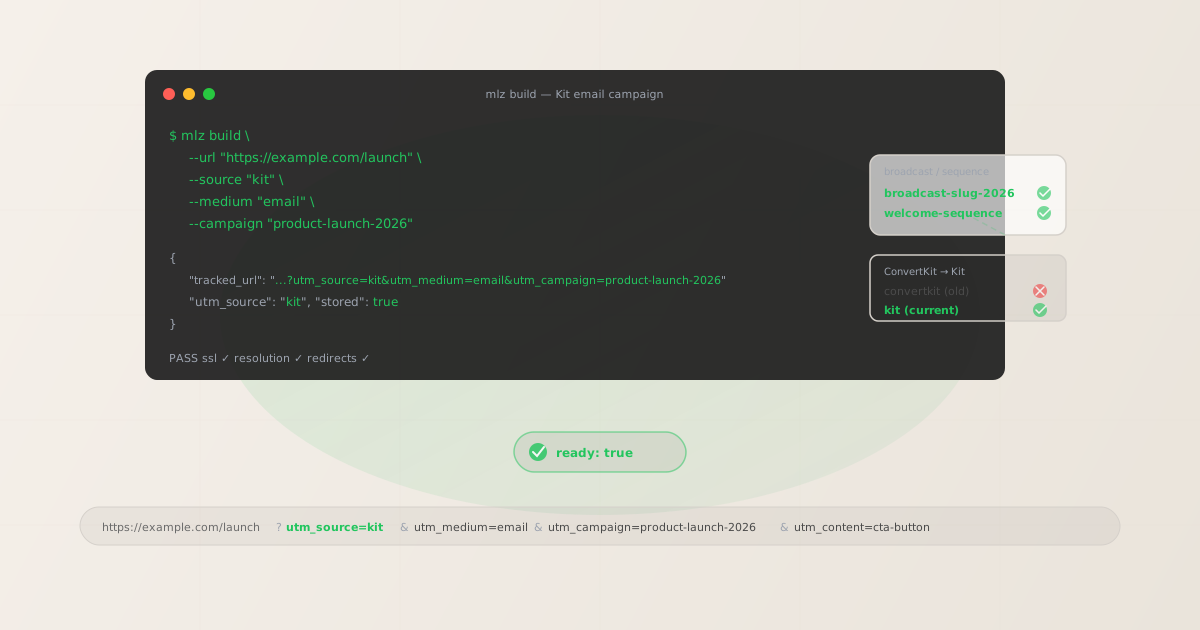
The ConvertKit-to-Kit rebrand and UTM parameters
ConvertKit rebranded to Kit in September 2024. The rebrand was a full platform rename — new domain (kit.com), new UI, new brand identity — but the underlying product remained continuous: the same email sends, sequences, automations, and subscriber database. For UTM tracking, this creates a specific data problem: sessions from broadcasts sent before September 2024 were attributed to utm_source=convertkit. Sessions from sends after the rebrand are attributed to utm_source=kit. In GA4's Traffic Acquisition report, these appear as two separate sources even though they represent the same channel.
This fragmentation makes year-over-year comparisons difficult. Any filter or segment that covers "Kit email traffic" needs to include both source values to capture the full channel picture — and any team member who joined after the rebrand won't know to look for the old name.
# What GA4 sees when both utm_source values are in use

# Pre-September 2024: old ConvertKit campaigns
utm_source=convertkit  utm_medium=email  sessions: 3,140
utm_source=convertkit  utm_medium=email  sessions: 2,890

# Post-September 2024: new Kit campaigns
utm_source=kit  utm_medium=email  sessions: 4,210
utm_source=kit  utm_medium=email  sessions: 3,680

# Same channel — split across two source rows in every report
The recommended approach is to migrate fully to utm_source=kit for all new campaigns and accept the historical data break. Do not maintain utm_source=convertkit going forward — using the old brand name on current sends perpetuates confusion for new team members and accumulates data in a stale bucket.
When you make the switch, add a GA4 annotation at the transition date so future analysts understand why the convertkit source stops appearing and kit begins. GA4 annotations are found in the Admin interface under Annotations — they appear as flags on charts when viewing the date range that includes the transition.
If your account still has sequence steps or broadcast templates from before the rebrand that embed utm_source=convertkit directly in link URLs, audit and update them now. Use mlz links list to find all stored links containing convertkit as the source and rebuild them with utm_source=kit.
The correct utm_source and utm_medium for Kit
For all Kit sends, use utm_source=kit. Kit is an email-first platform — unlike Brevo which also covers SMS and WhatsApp, Kit's primary channel is email, so utm_medium=email covers the vast majority of sends. The main variation in UTM parameters for Kit users is in utm_campaign, which must be handled differently for broadcasts versus sequences.
| Kit send type | utm_source | utm_medium | utm_campaign style |
|---|---|---|---|
| Broadcast (one-time send) | kit |
email |
Time-stamped slug: may-newsletter-2026 |
| Sequence email (automated series) | kit |
email |
Stable slug: welcome-sequence |
| Automation email (rule-triggered) | kit |
email |
Stable slug: post-purchase-followup |
| Creator Network referral link | kit |
referral |
Partnership or promo slug |
For utm_campaign, use lowercase hyphen-separated slugs throughout. Avoid uppercase, spaces, or special characters — Kit's default click tracking passes the full query string to the destination, but URL encoding of spaces and special characters can create inconsistent values in GA4 reports.
The key distinction between broadcasts and sequences is stability: a broadcast is a one-time send and its UTM campaign slug can include the date. A sequence runs continuously — the same email may send to new subscribers for months or years. Using a date-stamped slug in a sequence (welcome-sequence-may-2026) means the slug becomes inaccurate as time passes, and updating it mid-run creates a GA4 data break. Use stable, evergreen slugs for sequences: welcome-sequence, launch-sequence, onboarding-series.
Building Kit campaign links with mlz build
mlz build generates a normalised, validated tracked URL and stores the link for auditing. For a Kit broadcast email with a primary CTA:
# Primary CTA in a Kit broadcast email
$ mlz build \
  --url "https://example.com/product-launch" \
  --source "kit" \
  --medium "email" \
  --campaign "product-launch-may-2026" \
  --content "primary-cta"

{
  "tracked_url": "https://example.com/product-launch?utm_source=kit&utm_medium=email&utm_campaign=product-launch-may-2026&utm_content=primary-cta",
  "params": {
    "utm_source": "kit",
    "utm_medium": "email",
    "utm_campaign": "product-launch-may-2026",
    "utm_content": "primary-cta"
  },
  "link_id": "lnk_kt4p8r2n",
  "stored": true
}
Paste the tracked_url directly into the link field in Kit's email editor. With Kit's click tracking enabled, the click goes through Kit's tracking redirect, which records the click for Kit's own analytics, then forwards to your destination with all UTM parameters intact.
For Kit sequences, build links with stable campaign slugs. Since sequences run continuously, build these links once and store them — the same tracked URL will be reused every time a new subscriber enters the sequence:
# CTA link for email #3 in the welcome sequence
$ mlz build \
  --url "https://example.com/getting-started" \
  --source "kit" \
  --medium "email" \
  --campaign "welcome-sequence" \
  --content "email-3-cta"

{
  "tracked_url": "https://example.com/getting-started?utm_source=kit&utm_medium=email&utm_campaign=welcome-sequence&utm_content=email-3-cta",
  "params": {
    "utm_source": "kit",
    "utm_medium": "email",
    "utm_campaign": "welcome-sequence",
    "utm_content": "email-3-cta"
  },
  "link_id": "lnk_kt7q1m5w",
  "stored": true
}
Use utm_content to distinguish individual emails within a sequence: email-1-intro, email-2-value, email-3-cta, email-4-followup. With the campaign slug staying constant across all emails in the sequence, GA4 groups all sequence attribution under a single campaign row, while the utm_content dimension lets you compare which email in the sequence drives the most conversions.
How to manage Kit's built-in click tracking and UTM options
Kit includes click tracking for all links in broadcasts and sequences — when a subscriber clicks a link, the click is recorded in Kit's own analytics before forwarding the subscriber to your destination. This click tracking does not, by default, modify or append UTM parameters to the destination URL. Kit simply wraps your link in its own redirect and forwards the full URL, including any UTM parameters you added, unchanged to the destination.
Where complications arise is if you use Kit's optional UTM tracking feature. Kit allows you to configure UTM parameters at the account or broadcast level in Settings > Email Settings. When this feature is enabled, Kit appends its own utm_source, utm_medium, and utm_campaign values based on the broadcast or form name. If you have also manually embedded UTM parameters in your link templates, the result is two sets of parameters appended to the same URL. In URL query strings, when the same parameter key appears twice, GA4 typically records the last value — but the interaction is inconsistent and can produce unexpected attribution.
The reliable approach:
- Disable Kit's automatic UTM tagging in Settings > Email Settings. This prevents Kit from appending its own parameters and leaves your manually built UTM parameters as the only ones in the URL.
- Build all tracked URLs with
mlz buildand paste the resultingtracked_urldirectly into Kit's link editor. Because the UTM parameters are part of the destination URL itself (not appended by Kit's sending infrastructure), they are preserved through Kit's click-tracking redirect unchanged. - Test before sending: for any new broadcast or sequence, validate the destination URL with
mlz build --validateto confirm it resolves to a 200 response before the send goes out.
Validating Kit destination URLs before sending
Use mlz build --validate to confirm destination URLs respond correctly before sending a Kit broadcast or triggering a sequence. This confirms the landing page is live, uses HTTPS, and returns a 200 response:
$ mlz build \
  --url "https://example.com/product-launch" \
  --source "kit" \
  --medium "email" \
  --campaign "product-launch-may-2026" \
  --content "primary-cta" \
  --validate

{
  "tracked_url": "https://example.com/product-launch?utm_source=kit&utm_medium=email&utm_campaign=product-launch-may-2026&utm_content=primary-cta",
  "validation": {
    "valid": true,
    "checks": [
      { "check": "url_format", "status": "pass", "message": "URL format is valid." },
      { "check": "ssl", "status": "pass", "message": "URL uses HTTPS." },
      { "check": "resolution", "status": "pass", "message": "Destination responded with 200.", "details": { "response_time_ms": 182 } },
      { "check": "redirects", "status": "pass", "message": "No redirects detected." }
    ]
  },
  "link_id": "lnk_kt4p8r2n",
  "stored": true
}
For Kit sequences, the validation pattern is different from broadcasts: rather than validating once before a single send, you should validate sequence destination URLs periodically. A sequence that was built six months ago may now link to a page that has been redirected, retired, or changed. Set a recurring calendar reminder to validate all active Kit sequence destination URLs at least once per quarter — especially after website rebuilds, promotional campaign end dates, or landing page updates.
If a sequence email destination URL fails validation (returns a non-200 status or redirects to an unexpected page), update the tracked URL in Kit's sequence editor immediately. Because Kit sequences can be sending to new subscribers continuously, a broken destination URL in a sequence email is a persistent problem, not a one-time incident — every new subscriber who receives that email will encounter the broken destination until the link is updated.
Kit UTM tracking gotchas
- The ConvertKit utm_source legacy data problem
- Any broadcasts or sequence emails sent before September 2024 that used
utm_source=convertkitare permanently attributed toconvertkitin GA4. GA4 does not retroactively reclassify historical sessions. Migrating toutm_source=kitfor all new sends is the right call — accept the data break, add a GA4 annotation at the transition date, and move forward. Continuing to useutm_source=convertkiton new sends (to maintain apparent continuity in older date ranges) creates more confusion than the data break itself: new team members won't understand why current campaigns use the old brand name, and GA4 reports will show two active source rows indefinitely. - Kit sequences need stable campaign slugs — never include dates
- Kit sequences run continuously: the same email may be delivered to a new subscriber today and to another subscriber in eighteen months. If you use a date-stamped
utm_campaignslug in a sequence email — such aswelcome-sequence-may-2026— that slug becomes misleading the moment the calendar moves past May 2026. Worse, if you later update the slug to remove the date, GA4 creates a new campaign row and your sequence attribution splits in two. Use stable, evergreen slugs:welcome-sequence,onboarding-series,launch-sequence,re-engagement-flow. These slugs accurately describe the sequence at any point in time and accumulate attribution cleanly in GA4. - Kit's optional UTM tagging can create duplicate parameters
- Kit's Settings > Email Settings includes an option to automatically append UTM parameters to links in broadcasts. When enabled, Kit injects its own
utm_source,utm_medium, andutm_campaignvalues based on the broadcast settings. If you've also manually embedded UTM parameters in your link templates, you end up with two sets of the same parameters in the URL. The last-value-wins behavior in GA4 can assign unexpected attribution. Disable Kit's automatic UTM tagging entirely and manage all parameters withmlz build— this ensures exactly one set of parameters, with lowercase hyphenated values, in every tracked URL. - Kit broadcasts vs. sequences require different utm_content strategies
- In a broadcast, there's typically one or two CTAs — a primary and a secondary link.
utm_content=primary-ctaandutm_content=secondary-ctaare sufficient. In a sequence with 5–10 emails, each email is a distinct touchpoint, and you'll want to know which email in the series drove the conversion. Useutm_content=email-1-welcome,utm_content=email-2-case-study,utm_content=email-3-offerto tag each email individually. Combined with a stableutm_campaignslug for the sequence, you can then segment GA4 Explore reports byutm_contentto see each email's conversion contribution within the same sequence campaign. - Kit's Creator Network referral links need utm_medium=referral
- Kit's Creator Network allows newsletter creators to recommend each other's newsletters. When promoting your Kit newsletter via another creator's recommendation link, the traffic source is a referral — not a direct email send. If you're building landing page links for Creator Network promotions, use
utm_medium=referral(notutm_medium=email) to correctly categorise this traffic in GA4. Usingutm_medium=emailfor referral traffic would misattribute it to the Email channel in GA4's default channel groupings, conflating it with your direct broadcast and sequence traffic.
Kit UTM naming conventions
Recommended UTM parameter values for Kit across all send types, aligned with GA4 channel groupings:
- utm_source:
kit— lowercase, for all sends from Kit (broadcasts, sequences, automations). The old ConvertKit name is retired; do not use it for any new sends. - utm_medium:
emailfor all email sends (broadcasts, sequences, automations);referralfor Creator Network referral links. - utm_campaign: lowercase hyphen-separated slug — for broadcasts:
may-newsletter-2026,product-launch-may-2026,black-friday-2026; for sequences:welcome-sequence,onboarding-series,launch-sequence,re-engagement-flow. - utm_content: CTA or email identifier — for broadcasts:
primary-cta,secondary-cta,ps-link; for sequences:email-1-welcome,email-2-value,email-3-offer. - utm_term: Segment or subscriber tag identifier if relevant — e.g.
pro-subscribers,free-trial-users,course-buyers. Use sparingly for highly targeted segments within a single broadcast.
If your organisation uses Kit alongside other platforms — for example, Kit for newsletter and Klaviyo for eCommerce transactional email — keep the same cross-channel naming convention: platform name as utm_source, channel type as utm_medium. See the UTM naming conventions guide for the full cross-channel reference and the UTM tracking best practices guide for governance at scale.
FAQ
- Should I use utm_source=convertkit or utm_source=kit?
- Use
utm_source=kitfor all new campaigns. ConvertKit rebranded to Kit in September 2024 and the old name is retired. If your historical GA4 data has sessions underutm_source=convertkitfrom pre-rebrand sends, accept that data break — it's permanent. Add a GA4 annotation at the transition date so future analysts understand why theconvertkitsource stops appearing. Continuing to useutm_source=convertkiton new sends (to maintain apparent continuity in older date ranges) creates more confusion than the data break itself: new team members won't understand why current sends use the old brand name, and the data underconvertkitwill grow increasingly stale relative to the activekitbucket. - How do I track individual emails in a Kit sequence in GA4?
- Use a stable
utm_campaignslug for the entire sequence (e.g.welcome-sequence) and a uniqueutm_contentvalue for each email in the series (e.g.email-1-intro,email-2-value,email-3-cta). In GA4 Explore, create a report segmented by bothutm_campaignandutm_content— this shows conversions attributed to each individual email within the sequence while keeping all sequence attribution grouped under a single campaign name. Build each email's tracked URL withmlz build --campaign "welcome-sequence" --content "email-X-label"before embedding it in Kit's sequence editor. - Does Kit's click tracking preserve UTM parameters?
- Yes. Kit's click tracking wraps your link in a Kit redirect URL that records the click for Kit's own analytics, then forwards the subscriber to your destination with the full URL — including all UTM parameters — intact. This is standard behaviour for email marketing platforms. The only scenario where Kit's tracking can interfere with your UTM parameters is when Kit's optional automatic UTM tagging feature is also enabled in Settings > Email Settings. With both automatic tagging and manual UTM parameters active, you may end up with duplicate parameter keys in the URL. Disable Kit's automatic UTM tagging to avoid this.
- How often should I validate Kit sequence destination URLs?
- At minimum once per quarter, and immediately after any website change that touches landing pages your sequences link to. Kit sequences run continuously — a broken destination URL in a sequence email is a persistent problem that affects every new subscriber who enters the sequence. Set a recurring calendar reminder to run
mlz build --validate(ormlz check) against all active sequence destination URLs at the start of each quarter. If you have many sequence emails,mlz links listshows all stored links for your account, which you can then re-validate in bulk. - What utm_campaign slug should I use for Kit automations?
- Use descriptive, stable slugs that identify the automation's purpose without including dates:
post-purchase-followup,trial-expiry-reminder,webinar-confirmation,lead-magnet-delivery. Like sequence slugs, automation campaign slugs should be evergreen — the automation runs continuously and the slug will remain accurate for the lifetime of the automation. If you significantly redesign an automation, add a version suffix rather than a date:post-purchase-followup-v2. This creates a clean data break in GA4 without perpetuating a time-specific slug that becomes misleading as the calendar advances.
Recommended posts
Build Kit campaign links from the terminal
Pass --source "kit" --medium "email" to mlz build and get a normalised, validated URL ready to paste into Kit's campaign editor — lowercase values, no duplicate parameters from Kit's auto-tagging, stable slugs for sequences. Add --validate to confirm the destination resolves cleanly before every send.
1,000 links/month free. No credit card.
Your API key
Save this now — it won't be shown again.
npm install -g missinglinkz
Free plan: 1,000 links/month. No credit card. See the UTM tracking for developers guide for the full programmatic workflow.